
Abstract
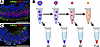
Autologous photoreceptor cell replacement is one of the most promising strategies currently being developed for the treatment of patients with inherited retinal degenerative blindness. Induced pluripotent stem cell–derived (iPSC-derived) retinal organoids, which faithfully recapitulate the structure of the neural retina, are an ideal source of transplantable photoreceptors required for these therapies. However, retinal organoids contain other retinal cell types, including bipolar, horizontal, and amacrine cells, which are unneeded and may reduce the potency of the final therapeutic product. Therefore, approaches for isolating fate-committed photoreceptor cells from dissociated retinal organoids are desirable. In this work, we present partial dissociation, a technique that leverages the high level of organization found in retinal organoids to enable selective enrichment of photoreceptor cells without the use of specialized equipment or reagents such as antibody labels. We demonstrate up to 90% photoreceptor cell purity by simply selecting cell fractions liberated from retinal organoids during enzymatic digestion in the absence of mechanical dissociation. Since the presented approach relies on the use of standard plasticware and commercially available current good manufacturing practice–compliant reagents, we believe that it is ideal for use in the preparation of clinical photoreceptor cell replacement therapies.
Authors
Nicholas E. Stone, Laura R. Bohrer, Nathaniel K. Mullin, Alexander Berthold, Allison T. Wright, Ian C. Han, Edwin M. Stone, Robert F. Mullins, Budd A. Tucker
This file is in Adobe Acrobat (PDF) format. If you have not installed and configured the Adobe Acrobat Reader on your system.
Having trouble reading a PDF?
PDFs are designed to be printed out and read, but if you prefer to read them online, you may find it easier if you increase the view size to 125%.
Having trouble saving a PDF?
Many versions of the free Acrobat Reader do not allow Save. You must instead save the PDF from the JCI Online page you downloaded it from. PC users: Right-click on the Download link and choose the option that says something like "Save Link As...". Mac users should hold the mouse button down on the link to get these same options.
Having trouble printing a PDF?
- Try printing one page at a time or to a newer printer.
- Try saving the file to disk before printing rather than opening it "on the fly." This requires that you configure your browser to "Save" rather than "Launch Application" for the file type "application/pdf", and can usually be done in the "Helper Applications" options.
- Make sure you are using the latest version of Adobe's Acrobat Reader.


