
Abstract
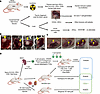
Stem cell–derived β cells offer a promising approach for type 1 diabetes (T1D) treatment. However, the processes of graft infiltration and rejection by immune cells remain poorly understood in humans. In this study, autologous or allogeneic stem cell–derived islets (SC-islets) were transplanted in human immune system mice and analyzed 14 to 18 weeks later. Imaging mass cytometry revealed unique characteristics of SC-islet grafts, including a high percentage of glucagon+ cells and the presence of cysts and CD57+ enterochromaffin cells, features not typically observed in endogenous or transplanted allogeneic primary pancreatic islets. Allogeneic SC-islet grafts exhibited heavy immune infiltration, cell proliferation, and pro-fibrotic processes, whereas autologous grafts showed minimal infiltration and little fibrosis. In some mice, autologous T cells expressing islet antigen-reactive (IAR) T cell receptors (TCRs) were adoptively transferred. Three weeks after transfer, autologous grafts injected with IAR-TCR+ T cells showed negligible immune infiltration, even though IAR-TCR+ T cells were detected in the spleen. Under the conditions tested, human SC-islet grafts were not rejected by an autologous immune system, even in the presence of autoreactive T cells, pointing to several limitations that remain to be addressed for a model of spontaneous autologous SC-islet infiltration and destruction.
Authors
Camillo Bechi Genzano, Giorgia Zanetti, Qian Du, Daniel Traum, Deeksha Lahori, Grant M. Downes, Sakshi A. Bhatele, Xiaolan Ding, Kyle D. Apley, Rebuma Firdessa Fite, Matthew Ishahak, Enrique Eduardo Sanchez-Castro, Jeffrey R. Millman, Yiming Luo, Klaus H. Kaestner, Cory Berkland, Dieter Egli, Megan Sykes, Remi J. Creusot
This file is in Adobe Acrobat (PDF) format. If you have not installed and configured the Adobe Acrobat Reader on your system.
Having trouble reading a PDF?
PDFs are designed to be printed out and read, but if you prefer to read them online, you may find it easier if you increase the view size to 125%.
Having trouble saving a PDF?
Many versions of the free Acrobat Reader do not allow Save. You must instead save the PDF from the JCI Online page you downloaded it from. PC users: Right-click on the Download link and choose the option that says something like "Save Link As...". Mac users should hold the mouse button down on the link to get these same options.
Having trouble printing a PDF?
- Try printing one page at a time or to a newer printer.
- Try saving the file to disk before printing rather than opening it "on the fly." This requires that you configure your browser to "Save" rather than "Launch Application" for the file type "application/pdf", and can usually be done in the "Helper Applications" options.
- Make sure you are using the latest version of Adobe's Acrobat Reader.


