
Abstract
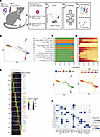
Tissue-resident memory T (TRM) cells play a central role in immune responses across all barrier tissues after infection. However, the mechanisms that drive TRM differentiation and priming for their recall effector function remains unclear. In this study, we leveraged newly generated and publicly available single-cell RNA-seq data generated across 10 developmental time points to define features of CD8+ TRM across both skin and small-intestine intraepithelial lymphocytes (siIEL). We employed linear modeling to capture gene programs that increase their expression levels in T cells transitioning from an effector to a memory state. In addition to capturing tissue-specific gene programs, we defined a temporal TRM signature across skin and siIEL that can distinguish TRM from circulating T cell populations. This TRM signature highlights biology that is missed in published signatures that compared bulk TRM to naive or nontissue resident memory populations. This temporal TRM signature included the AP-1 transcription factor family members Fos, Fosb, Fosl2, and Junb. ATAC-seq analysis detected AP-1–specific motifs at open chromatin sites in mature TRM. Cyclic immunofluorescence (CyCIF) tissue imaging detected nuclear colocalization of AP-1 members in resting CD8+ TRM greater than 100 days after infection. Taken together, these results reveal a critical role of AP-1 transcription factor members in TRM biology.
Authors
Neal P. Smith, Yu Yan, Youdong Pan, Jason B. Williams, Kasidet Manakongtreecheep, Shishir M. Pant, Jingxia Zhao, Tian Tian, Timothy Pan, Claire Stingley, Kevin Wu, Jiang Zhang, Alexander L. Kley, Peter K. Sorger, Alexandra-Chloé Villani, Thomas S. Kupper
This file is in Adobe Acrobat (PDF) format. If you have not installed and configured the Adobe Acrobat Reader on your system.
Having trouble reading a PDF?
PDFs are designed to be printed out and read, but if you prefer to read them online, you may find it easier if you increase the view size to 125%.
Having trouble saving a PDF?
Many versions of the free Acrobat Reader do not allow Save. You must instead save the PDF from the JCI Online page you downloaded it from. PC users: Right-click on the Download link and choose the option that says something like "Save Link As...". Mac users should hold the mouse button down on the link to get these same options.
Having trouble printing a PDF?
- Try printing one page at a time or to a newer printer.
- Try saving the file to disk before printing rather than opening it "on the fly." This requires that you configure your browser to "Save" rather than "Launch Application" for the file type "application/pdf", and can usually be done in the "Helper Applications" options.
- Make sure you are using the latest version of Adobe's Acrobat Reader.


